What is @Deprecated annotation in Java
Java @Deprecated Annotation
Where @Deprecated can be used
- Method can be marked @Deprecated.
- Class can be marked with @Deprecated.
- Package can be also marked deprecated with @Deprecated.
Effect of marking with @Deprecated
Example
/**
* Sample Calculator which can add two numbers
*
*/
public class OldCalculator {
/**
* Add two number and return the value as Number
*
* @param a : First number
* @param b : Second number
* @return result of addition as Number
* @see Number
*/
public Number add(Number a, Number b) {
return a.doubleValue() + b.doubleValue();
}
@Deprecated(forRemoval = false, since = "1.1")
public Number add(CalParameter a, CalParameter b) {
return a.val.doubleValue() + b.val.doubleValue();
}
}
@Deprecated
class CalParameter {
Integer val;
}
Documentation of @Deprecated
When to use @Deprecated
Create Java project using maven
- Java 18.0.1.1 2022-04-22
- Apache Maven 4.0.0-alpha-3
- OS: MacOS Monterey (M1)
- Eclipse IDE
Create project
mvn archetype:generate -DgroupId=com.project -DartifactId=java-module-project -DarchetypeArtifactId=maven-archetype-quickstart -DinteractiveMode=false
$ mvn archetype:generate -DgroupId=com.project -DartifactId=java-module-project -DarchetypeArtifactId=maven-archetype-quickstart -DinteractiveMode=false [INFO] Scanning for projects... [INFO] [INFO] -----------------------------------------< org.apache.maven:standalone-pom >----------------------------------------- [INFO] Building Maven Stub Project (No POM) 1 [INFO] -------------------------------------------------------[ pom ]------------------------------------------------------- [INFO] [INFO] --- archetype:3.2.1:generate (default-cli) @ standalone-pom --- [INFO] Generating project in Batch mode [INFO] ---------------------------------------------------------------------------- [INFO] Using following parameters for creating project from Old (1.x) Archetype: maven-archetype-quickstart:1.0 [INFO] ---------------------------------------------------------------------------- [INFO] Parameter: basedir, Value: /Users/sbhome [INFO] Parameter: package, Value: com.project [INFO] Parameter: groupId, Value: com.project [INFO] Parameter: artifactId, Value: java-module-project [INFO] Parameter: packageName, Value: com.project [INFO] Parameter: version, Value: 1.0-SNAPSHOT [INFO] project created from Old (1.x) Archetype in dir: /Users/sbhome/java-module-project [INFO] --------------------------------------------------------------------------------------------------------------------- [INFO] BUILD SUCCESS [INFO] --------------------------------------------------------------------------------------------------------------------- [INFO] Total time: 6.667 s [INFO] Finished at: 2023-02-07T22:46:00-08:00 [INFO] --------------------------------------------------------------------------------------------------------------------- Terminal:: $
cd java-module-project
Create Eclipse Project
mvn eclipse:eclipse
[INFO] Scanning for projects... [INFO] [INFO] -----------------------------------------< com.project:java-module-project >----------------------------------------- [INFO] Building java-module-project 1.0-SNAPSHOT [INFO] from pom.xml [INFO] -------------------------------------------------------[ jar ]------------------------------------------------------- [INFO] [INFO] --- eclipse:2.10:eclipse (default-cli) @ java-module-project --- [WARNING] The POM for org.apache.maven.wagon:wagon-http-lightweight:jar:1.0-beta-6 is invalid, transitive dependencies (if any) will not be available, enable verbose output (-X) for more details [WARNING] The POM for org.apache.maven.wagon:wagon-http:jar:1.0-beta-6 is invalid, transitive dependencies (if any) will not be available, enable verbose output (-X) for more details [WARNING] The POM for org.apache.maven.wagon:wagon-webdav-jackrabbit:jar:1.0-beta-6 is invalid, transitive dependencies (if any) will not be available, enable verbose output (-X) for more details [WARNING] The POM for org.apache.maven.wagon:wagon-http-lightweight:jar:1.0-beta-2 is invalid, transitive dependencies (if any) will not be available, enable verbose output (-X) for more details [INFO] Using Eclipse Workspace: null [INFO] Adding default classpath container: org.eclipse.jdt.launching.JRE_CONTAINER [INFO] Not writing settings - defaults suffice [INFO] Wrote Eclipse project for "java-module-project" to /Users/sbhome/java-module-project. [INFO] [INFO] --------------------------------------------------------------------------------------------------------------------- [INFO] BUILD SUCCESS [INFO] --------------------------------------------------------------------------------------------------------------------- [INFO] Total time: 0.494 s [INFO] Finished at: 2023-02-07T22:51:03-08:00 [INFO] ---------------------------------------------------------------------------------------------------------------------
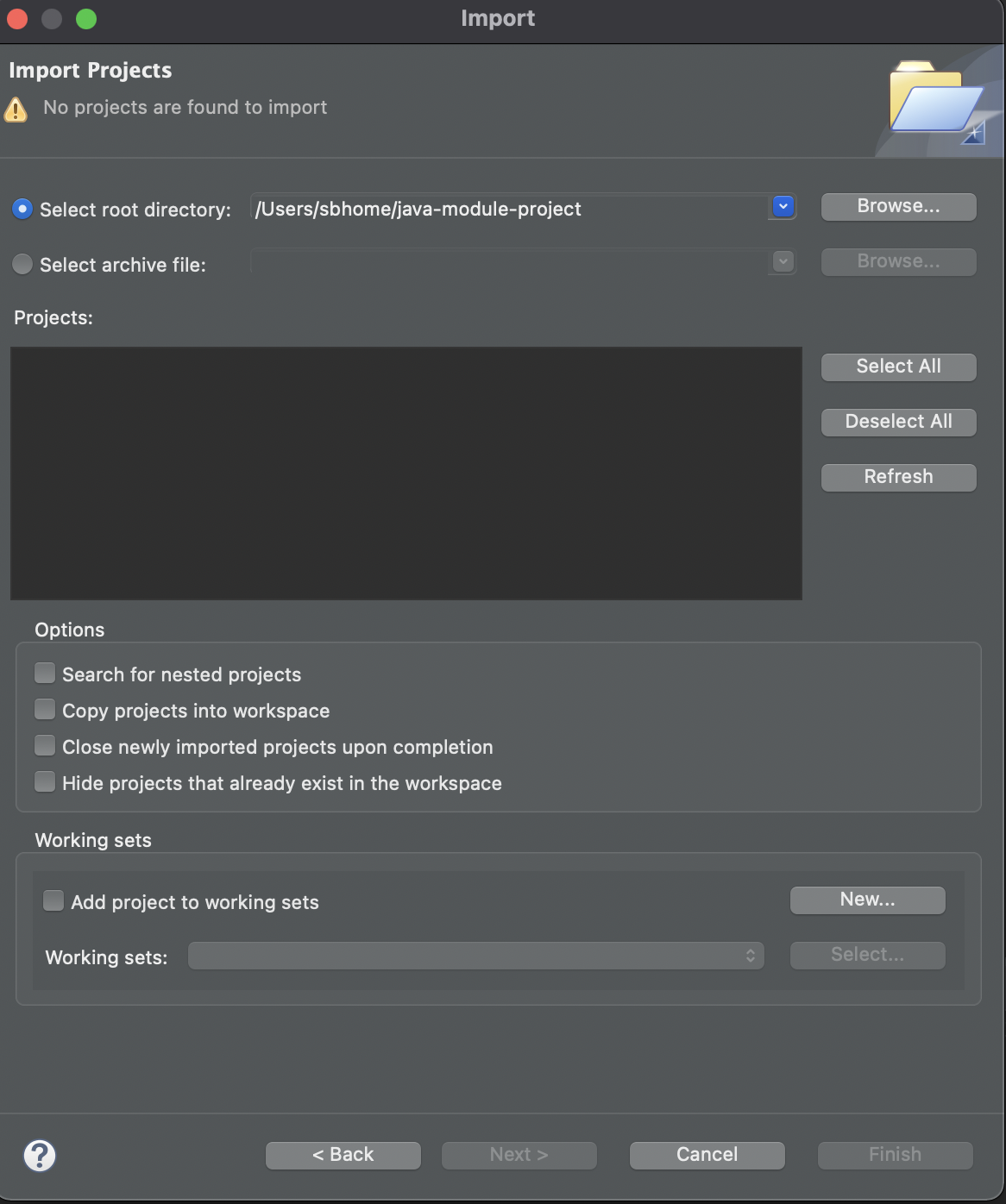
Import Project in Eclipse
Project in Eclipse
POM file
<project xmlns="http://maven.apache.org/POM/4.0.0" xmlns:xsi="http://www.w3.org/2001/XMLSchema-instance"
xsi:schemaLocation="http://maven.apache.org/POM/4.0.0 http://maven.apache.org/maven-v4_0_0.xsd">
<modelVersion>4.0.0</modelVersion>
<groupId>com.project</groupId>
<artifactId>java-module-project</artifactId>
<packaging>jar</packaging>
<version>1.0-SNAPSHOT</version>
<name>java-module-project</name>
<url>http://maven.apache.org</url>
<dependencies>
<dependency>
<groupId>junit</groupId>
<artifactId>junit</artifactId>
<version>3.8.1</version>
<scope>test</scope>
</dependency>
</dependencies>
</project>
Build Project
mvn install
[INFO] T E S T S [INFO] ------------------------------------------------------- [INFO] Running com.project.AppTest [INFO] Tests run: 1, Failures: 0, Errors: 0, Skipped: 0, Time elapsed: 0.006 s - in com.project.AppTest [INFO] [INFO] Results: [INFO] [INFO] Tests run: 1, Failures: 0, Errors: 0, Skipped: 0 [INFO] [INFO] [INFO] --- jar:3.2.0:jar (default-jar) @ java-module-project --- [INFO] Building jar: java-module-project-1.0-SNAPSHOT.jar [INFO] [INFO] --- install:3.0.0-M1:install (default-install) @ java-module-project --- [INFO] [INFO] --------------------------------------------------------------------------------------------------------------------- [INFO] BUILD SUCCESS
Java logical operator short circuit with example
Java logical operator short circuiting
private static boolean appleIsFruit() {
System.out.println("calling apple ");
return true;
}
private static boolean bananaIsFruit() {
System.out.println("calling banana ");
return true;
}
private static boolean cloudIsfruit() {
System.out.println("calling cloud ");
return false;
}
System.out.println("\n\napple | banana");
if (appleIsFruit() | bananaIsFruit()) {
System.out.println("inside apple | banana");
}
System.out.println("\n\ncloud & apple");
if (cloudIsfruit() & appleIsFruit()) {
System.out.println("inside cloud & apple");
}apple | banana calling apple calling banana inside apple | banana cloud & apple calling cloud calling apple
System.out.println("apple || banana");
if (appleIsFruit() || bananaIsFruit()) {
System.out.println("inside apple || banana");
}
System.out.println("\n\ncloud && apple");
if (cloudIsfruit() && appleIsFruit()) {
System.out.println("inside cloud && apple");
}apple || banana calling apple inside apple || banana cloud && apple calling cloud
Summary
How to iterate Java Map
Map<Integer, String> map = new HashMap<>();
map.put(1,"Argentina");
map.put(2,"France");
map.put(3,"Brazil");
map.put(4,"Germany");//EntrySet Iterator
System.out.println("\nEntrySet foreach");
Iterator<Entry<Integer, String>> it = map.entrySet().iterator();
while(it.hasNext()) {
Map.Entry<Integer, String> keyVal = it.next();
System.out.println(keyVal.getKey() + " " + keyVal.getValue());
}//EntrySet and foreach
System.out.println("\nEntrySet foreach");
Set<Entry<Integer, String>> entrySet = map.entrySet();
entrySet.forEach((e-> { System.out.println(e.getKey() + " " + e.getValue());}));//Keyset Iterator
System.out.println("\nKeyset Iterator");
Iterator<Integer> kit = map.keySet().iterator();
while(kit.hasNext()) {
Integer key = kit.next();
System.out.println(key + " " + map.get(key));
}//Keyset For loop
System.out.println("\nKeyset For loop");
for (Integer key : map.keySet()) {
System.out.println(key + " " + map.get(key));
}//map foreach (Java 8 Lambda)
System.out.println("\nUsing Map.foreach (Java 8 Lambda");
map.forEach((key,value)-> {System.out.println(key + " " + value);});Summary
Java LinkedHashMap.removeEldestEntry method example
When to use LinkedHashMap.removeEldestEntry method
removeEldestEntry method exists only on subclasses of LinkedHashMap.
How it works
removeEldestEntryis always invoked after an element is inserted.- Based on the method’s return value:
- Returns true: The oldest entry is removed.
- Always returns true: The map continuously removes entries (will become empty).
- Returns false: Nothing is removed; behaves like a normal LinkedHashMap.
After every put or putAll insertion, the eldest element may be removed depending on the logic. The JavaDoc provides a clear example of this usage.
Example: removeEldestEntry
import java.util.LinkedHashMap;
import java.util.Map;
public class MapRemoveEntry {
public static void main(String[] args) {
LinkedHashMap<Integer, String> map = new LinkedHashMap<Integer, String>() {
private static final long serialVersionUID = 1L;
@Override
protected boolean removeEldestEntry(Map.Entry<Integer, String> eldest) {
return size() > 4;
}
};
map.put(0, "A");
map.put(1, "B");
map.put(2, "C");
map.put(3, "D");
map.put(4, "E");
map.forEach((k, v) -> System.out.println("key = " + k + " value = " + v));
}
}
Output:
key = 2 value = C
key = 3 value = D
key = 4 value = E
Explanation: The method removeEldestEntry returns true when the map size is greater than 4. This removes the oldest entry (key=0, value=A).
Summary
Using removeEldestEntry, you can control when to remove the oldest entry from a map. This is particularly useful for implementing caches where you want to limit the number of stored items.
About sealed classes and interfaces
Defining sealed class
sealed Tesla
package java17.sealed;
public abstract sealed class Tesla permits Model3, ModelS, TeslaSUV{
public abstract Integer maxRange();
public String basePrice() {
return "25000 USD";
}
}
//Subclass 1
public final class Model3 extends Tesla {
@Override
public Integer maxRange() {
return 200;
}
}
//Subclass 2
public final class ModelS extends Tesla {
@Override
public Integer maxRange() {
return 400;
}
}
//Subclass3 (non-sealed)
public non-sealed class TeslaSUV extends Tesla {
@Override
public Integer maxRange() {
// TODO Auto-generated method stub
return null;
}
}
Style Two: Using member classes
package java17.sealed;
public sealed class BMWCars {
public final class BMW3 extends BMWCars implements ElectricVehicle{
}
public final class BMWI extends BMWCars implements Vehicle {
}
public non-sealed class BMWJV extends BMWCars implements Vehicle {
}
}
Rules for Defining Sealed Classes or Interfaces
Summary
Java record in details with example
package Java14;
public record AddressRecord(String street, String city, Integer zip, String state, String country) {
}
package Java14;
public class AddressRecordDemo {
public static void main (String arg[]) {
AddressRecord address1 = new AddressRecord("1044 Main Street", "Livermore", 94550, "CA", "USA");
System.out.println(address1.street());
System.out.println(address1.city());
System.out.println(address1.state());
}
}
- record can have Constructor.
- record can have only static fields.
- record cannot have instance field.
- record can implement Interfaces.
- We cannot extends record since implicitly it is final.
How to check if a Java object is final
final class MyCustomClass {
}Using java.lang.reflect.Modifier
import java.lang.reflect.Modifier;
public class JavaReflectionModifiers {
public static void main(String[] args) {
//prints 16
System.out.println(MyCustomClass.class.getModifiers());
//returns true
Modifier.isFinal(MyCustomClass.class.getModifiers());
}
}
final class MyCustomClass {
}More Examples
package Java14;
import java.lang.reflect.Modifier;
public class JavaReflectionModifiers {
public static void main(String[] args) {
System.out.println(MyCustomClass.class.getModifiers());
//prints true
System.out.println(Modifier.isFinal(MyCustomClass.class.getModifiers()));
//prints true
System.out.println(Modifier.isFinal(String.class.getModifiers()));
//prints false
System.out.println(Modifier.isFinal(Number.class.getModifiers()));
}
}
final class MyCustomClass {
}Can Java record be extended?
record MobilePhone(String brand, String modelName, Number osVersion, boolean canFlip) {
}package Java14;
import java.lang.reflect.Modifier;
public class RecordFinalTest {
public static void main(String[] args) {
MobilePhone phone1 = new MobilePhone("Samsung", "Galaxy1", 1, false);
//false
System.out.println(Modifier.isFinal(phone1.getClass().getModifiers()));
//false
System.out.println(Modifier.isFinal(MobilePhone.class.getModifiers()));
}
}
References
How to create a Doubly Linked List in Java
How to create double linked list in Java
class MyLinkedList<E> {
/* first points to head of the list */
public Node<E> first = null;
/* last points to tail of the list */
public Node<E> last = null;
/**
* Add item to tail (end) of the List
*
* @param item
* @return
*/
public boolean add(E item) {
Node<E> newNode = new Node<E>(last, item, null);
if (last == null) {
// last points to the new node created
first = newNode;
} else {
last.next = newNode;
}
// update last so that it points to the new node
last = newNode;
return true;
}
static class Node<E> {
public E value;
public Node<E> next;
public Node<E> prev;
Node(Node<E> prev, E element, Node<E> next) {
this.value = element;
this.next = next;
this.prev = prev;
}
}
}//create instance
MyLinkedList<Integer> list = new MyLinkedList<Integer>();
//add values 1,2,3,4,5
list.add(1);
list.add(2);
list.add(3);
list.add(4);
list.add(5);//Get the first node (head node) and then print it by traversing all nodes
MyLinkedList.Node<Integer> node = list.first;
while (node != null) {
System.out.println("Content of Node: " + node.value);
node = node.next;
}Content of Node: 1 Content of Node: 2 Content of Node: 3 Content of Node: 4 Content of Node: 5
Syntax Highlighting on Webpage including Blogger.com
Prism Source
Adding Prism JS
<head>
<link rel="stylesheet" href="https://cdn.jsdelivr.net/npm/prismjs@1.29.0/themes/prism.min.css" integrity="sha256-ko4j5rn874LF8dHwW29/xabhh8YBleWfvxb8nQce4Fc=" crossorigin="anonymous">
<script src="https://cdn.jsdelivr.net/npm/prismjs@1.29.0/prism.min.js"></script>
<script src="https://cdn.jsdelivr.net/npm/prismjs@1.29.0/plugins/autoloader/prism-autoloader.min.js"></script>
</head>
Use respective language css class in page
<pre>
<code class="language-java">
Java Code here
</code>
</pre>Example with Java Script
<pre>
<code class="language-javascript">
Javascript Code here
</code>
</pre>Java sealed and non-sealed classes
About sealed classes and interfaces
Defining sealed class (Two Styles)
Style One: Using permit keyword
package java17.sealed;
public abstract sealed class Tesla permits Model3, ModelS, TeslaSUV{
public abstract Integer maxRange();
public String basePrice() {
return "25000 USD";
}
}
//Subclass 1
public final class Model3 extends Tesla {
@Override
public Integer maxRange() {
return 200;
}
}
//Subclass 2
public final class ModelS extends Tesla {
@Override
public Integer maxRange() {
return 400;
}
}
//Subclass3 (non-sealed)
public non-sealed class TeslaSUV extends Tesla {
@Override
public Integer maxRange() {
// TODO Auto-generated method stub
return null;
}
}
Style Two: Using member classes
package java17.sealed;
public sealed class BMWCars {
public final class BMW3 extends BMWCars implements ElectricVehicle{
}
public final class BMWI extends BMWCars implements Vehicle {
}
public non-sealed class BMWJV extends BMWCars implements Vehicle {
}
}
Rules for Defining Sealed Classes or Interfaces
Summary
This article shows how to install Maven (3.6.3) on macOS Monterey(version 12.2.1) with M1 processor.
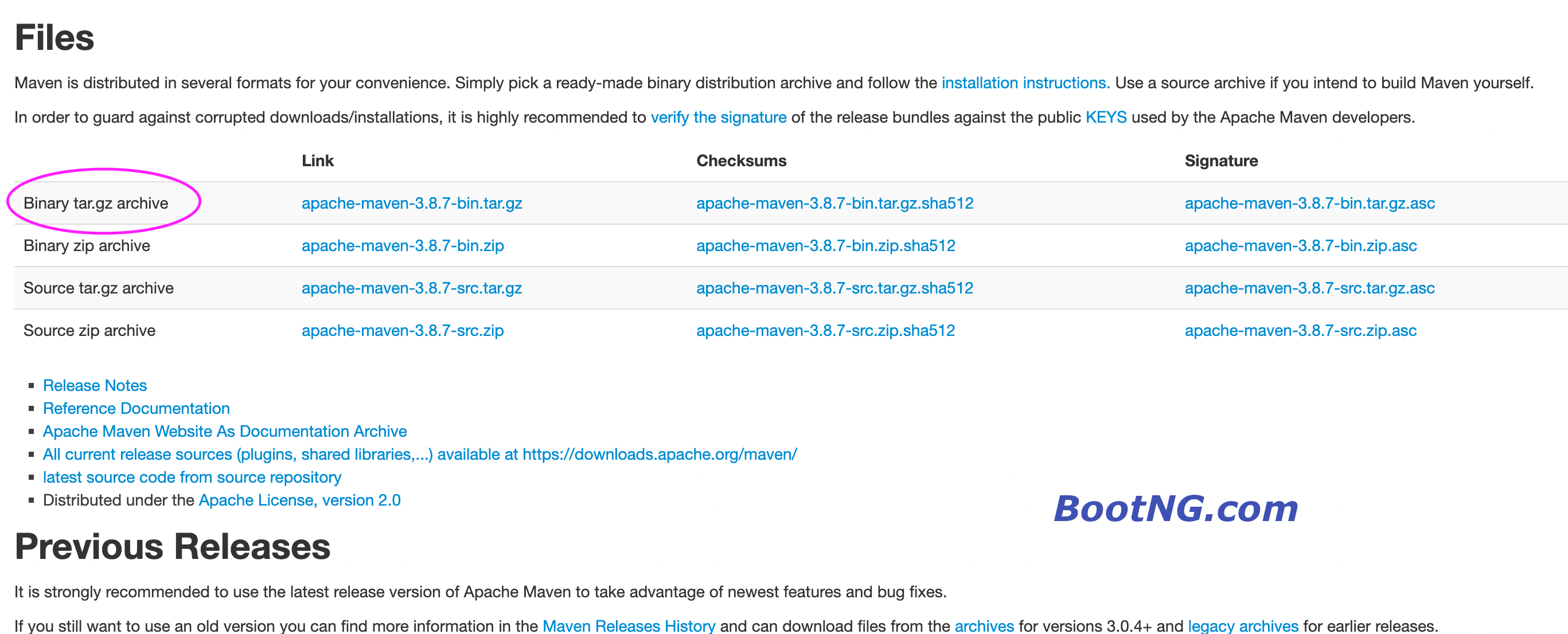
Download Maven
Install Maven
Go to the download locationx apache-maven-4.0.0-alpha-3/bin/mvn.cmd x apache-maven-4.0.0-alpha-3/bin/mvn x apache-maven-4.0.0-alpha-3/README.txt x apache-maven-4.0.0-alpha-3/LICENSE x apache-maven-4.0.0-alpha-3/NOTICE x apache-maven-4.0.0-alpha-3/lib/ x apache-maven-4.0.0-alpha-3/lib/aopalliance.license x apache-maven-4.0.0-alpha-3/lib/commons-cli.license x apache-maven-4.0.0-alpha-3/lib/commons-codec.license x apache-maven-4.0.0-alpha-3/lib/commons-lang3.license x apache-maven-4.0.0-alpha-3/lib/failureaccess.license x apache-maven-4.0.0-alpha-3/lib/guava.license x apache-maven-4.0.0-alpha-3/lib/guice.license x apache-maven-4.0.0-alpha-3/lib/httpclient.license x apache-maven-4.0.0-alpha-3/lib/httpcore.license
Install Maven
Apache Maven 4.0.0-alpha-3 (2ccf57baa5191468f9911fe85fd99672ac3bacb9) Maven home: /Users/SiddB/DevRuntime/apache-maven-4.0.0-alpha-3 Java version: 18.0.1.1, vendor: Oracle Corporation, runtime: /Library/Java/JavaVirtualMachines/jdk-18.0.1.1.jdk/Contents/Home Default locale: en_US, platform encoding: UTF-8 OS name: "mac os x", version: "12.2.1", arch: "aarch64", family: "mac"
JUnit5 Custom Name for Tests
JUnit 5 Example : Custom Display Name
Example 1 without Display name
package com.bootng.display;
import org.junit.jupiter.api.DisplayName;
import org.junit.jupiter.api.Test;
public class DisplayCustomNameTest {
@Test
public void test_if_it_will_rain() {
}
@Test
public void test_if_it_will_be_cloudy() {
}
@Test
public void test_if_it_will_be_sunny() {
}
}
Display CustomName Example
package com.bootng.display;
@DisplayName("Vacation Weather Test")
public class DisplayCustNameTest {
@DisplayName("🌧")
@Test
public void test_if_it_will_rain() {
}
@DisplayName("🌨")
@Test
public void test_if_it_will_be_cloudy() {
}
@DisplayName("🌞")
@Test
public void test_if_it_will_be_sunny() {
}
}
We can also use a Custom Name generator to generate the test names.
As of Version 5.4 it comes with the following generators out of the box.
Custom Name Generator Example
package com.bootng.display;
import org.junit.jupiter.api.DisplayName;
import org.junit.jupiter.api.Test;
@DisplayName("Weather Test DisplayExample ")
@DisplayNameGeneration(DisplayNameGenerator.ReplaceUnderscores.class)
public class DisplayGeneratorExampleTest {
@Test
public void test_if_it_will_rain() {
}
@Test
public void test_if_it_will_be_cloudy() {
}
@Test
public void test_if_it_will_be_sunny() {
}
}
Sublime find special characters
Using Regular Expression
[^\x00-\x7F]
Using Plugins
Generating Fibonacci numbers in java
Generating Fibonacci number in java
public int fib(int n) {
if (n == 0)
return 0;
else if (n == 1)
return 1;
else
return fib(n - 1) + fib(n - 2);
}public static int fib_topdown(int n, int td[]) {
if (td[n] != 0 && n != 0)
return td[n];
else if (n == 0)
td[n] = 0;
else if (n == 1)
td[n] = 1;
else
td[n] = fib_topdown(n - 1, td) + fib_topdown(n - 2, td);
return td[n];
}
public static int fib_bottomup(int n) {
if (n < 2)
return n;
int f0 = 0;
int f1 = 1;
int f2 = 0;
for (int i = 2; i <= n; i++) {
f2 = f0 + f1;
f0 = f1;
f1 = f2;
}
return f2;
}
References
how to skip tests in maven
How to skip test in Maven
mvn install -DskipTests
References
Gaussian Mixture Models Explained
Following article is a very good one explaining the Gaussian Mixture model along with python code.
https://towardsdatascience.com/gaussian-mixture-models-explained-6986aaf5a95